16-Color Printing ReadyACE 2 Pro DryingEnclosed CoreXY Platform320°C High-Temp HotendAutomated Multi-Material Workflow65°C Active Filament Drying
AAnycubic
Anycubic
# Anycubic Kobra S1 ACE 2 Pro Combo
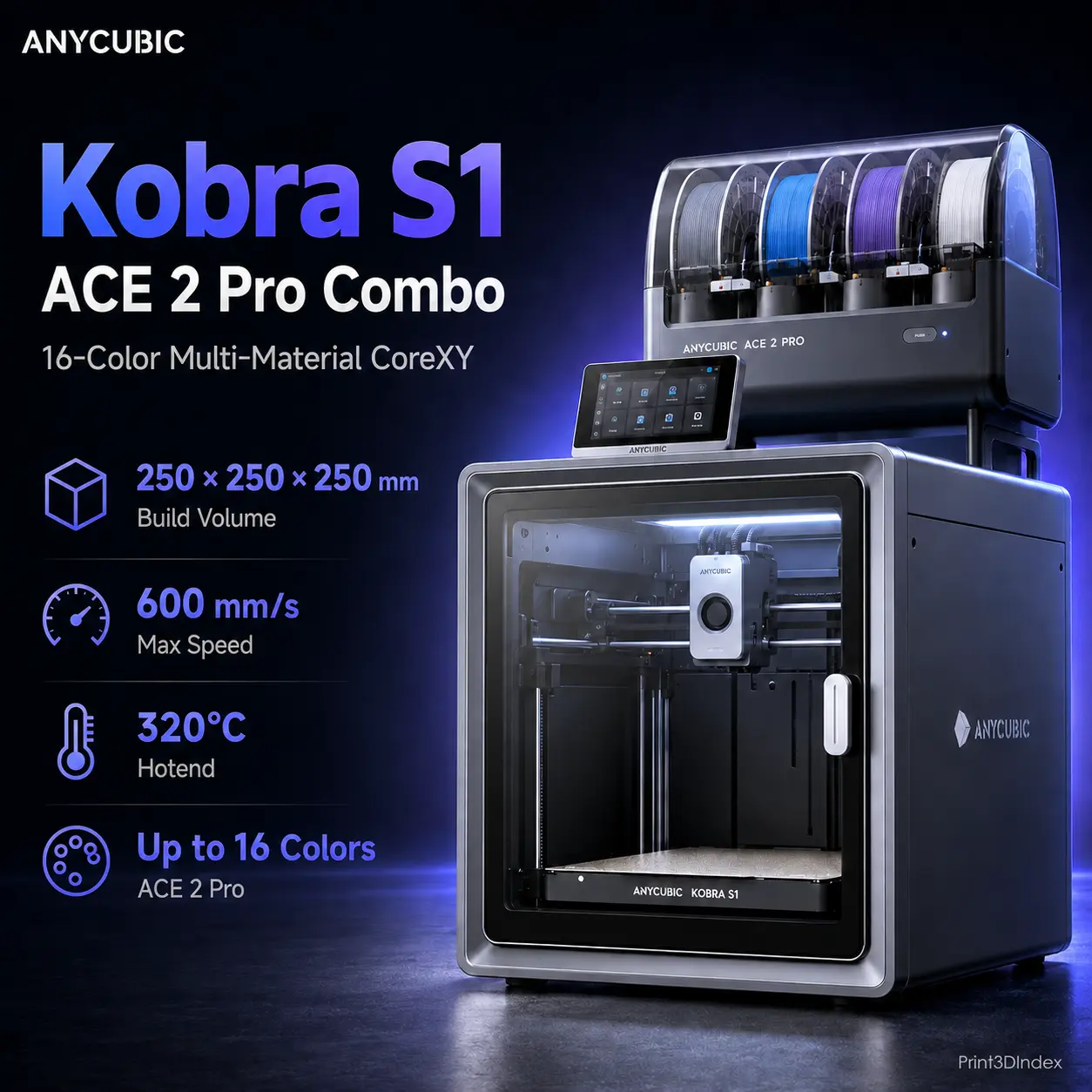
The Anycubic Kobra S1 ACE 2 Pro Combo pairs Anycubic's fully enclosed Kobra S1 CoreXY printer with the newer ACE 2 Pro multi-color and filament-management system. The standard package includes one ACE 2 Pro for four-color printing, while the platform can expand to up to 16 colors with additional ACE 2 Pro units and the required filament-hub hardware.
The printer provides a 250 × 250 × 250 mm build volume, a 320°C hotend, a 120°C PEI spring-steel bed, and speeds up to 600 mm/s with 20,000 mm/s² maximum acceleration. Anycubic recommends 300 mm/s for general printing.
ACE 2 Pro is the main upgrade over the original Kobra S1 Combo. It raises active filament drying from 55°C to 65°C, adds real-time temperature and humidity monitoring, active moisture removal, sealed storage, improved feeding hardware, and broader expansion from eight to sixteen colors.
The Kobra S1 itself remains a single-nozzle machine. Multi-color printing is automated by feeding different filaments into the shared hotend, so color changes still involve filament switching and purge rather than independent toolheads.
For current specifications and pricing, see the official Anycubic Kobra S1 ACE 2 Pro Combo page and official ACE 2 Pro page.
| Specification | Value |
|---|---|
| Printing technology | FDM / FFF |
| Motion system | CoreXY |
| Build volume | 250 × 250 × 250 mm |
| Layer thickness | 0.08–0.28 mm |
| Standard nozzle | 0.4 mm |
| Optional nozzle sizes | 0.25 / 0.6 / 0.8 mm |
| Maximum nozzle temperature | 320°C |
| Maximum bed temperature | 120°C |
| Build surface | PEI spring-steel plate |
| Recommended print speed | 300 mm/s |
| Maximum print speed | 600 mm/s |
| Recommended acceleration | 10,000 mm/s² |
| Maximum acceleration | 20,000 mm/s² |
| Extrusion | Short-distance extrusion |
| X/Y motion | Linear rods |
| Z motion | Single motor with three guide poles |
| Bed leveling | LeviQ 3.0 automatic leveling |
| Z-offset | Automatic |
| Pressure Advance / flow calibration | Supported |
| Firmware | Kobra OS |
| Included multi-color system | ACE 2 Pro |
| Colors included | 4 |
| Maximum colors | Up to 16 with expansion hardware |
| ACE 2 Pro drying | Up to 65°C |
| Camera | Built-in HD camera, up to 480p |
| Display | 4.3-inch capacitive touchscreen |
| Printer noise | ≤46 dB standard / ≤44 dB quiet mode |
| Control | Printer, Anycubic Slicer Next, Anycubic App, USB |
| Printer dimensions | 400 × 410 × 490 mm |
| ACE 2 Pro dimensions | 368 × 291.5 × 236.5 mm |
| ACE 2 Pro weight | 3.7 kg |
| Power input | 100–120 V AC / 200–240 V AC |
| Printer rated power | 325 W / 1300 W depending voltage version |
Speed note: 600 mm/s is Anycubic's maximum print-speed specification. The recommended general-use speed is 300 mm/s.
The Kobra S1 ACE 2 Pro Combo vs Kobra S1 Combo distinction is mostly about the material system rather than the printer chassis.
The original Anycubic Kobra S1 Combo uses the first-generation ACE Pro and supports four or eight colors.
The ACE 2 Pro version keeps the same 250 mm cube, 320°C hotend, 120°C bed, CoreXY architecture, 600 mm/s maximum speed, LeviQ 3.0 leveling, camera, and Kobra OS.
ACE 2 Pro raises drying from 55°C to 65°C, adds humidity/temperature sensing, active moisture removal, sealed storage, updated brushless feeding, filament-runout handling, and expansion from eight to 16 colors. For a new purchase, it is the more capable long-term multi-color configuration.
One ACE 2 Pro handles four filament channels.
Anycubic states that the full 16-color workflow uses four ACE 2 Pro units together with the compatible multi-color hub hardware.
The US$574 package includes one ACE 2 Pro for four colors; an eight-color bundle adds a second unit. Because every filament still shares one nozzle, color changes create purge waste and transition time.
ACE 2 Pro supports active drying up to 65°C and can dry filament during printing.
It combines temperature/humidity monitoring, active moisture removal, sealed storage, four brushless feed motors, automatic feeding/retraction, refill support, and Anycubic filament recognition where supported. Anycubic rates ACE 2 Pro at about 48 dB while printing and 55 dB with drying enabled under its test conditions.
Anycubic's current Kobra S1 ACE 2 Pro Combo page explicitly lists:
TPU 95A is supported by the printer but not through ACE 2 Pro.
Anycubic instructs users to feed TPU directly into the printer for single-color flexible-filament work.
That means TPU should not be treated as part of the standard four-, eight-, or sixteen-color ACE 2 Pro workflow.
The fully enclosed chassis and 120°C bed make the Kobra S1 much better suited to ABS and ASA than an open-frame printer.
However, Anycubic does not publish a dedicated active chamber heater or controlled chamber-temperature specification for this model. The enclosure retains process heat, but it should not be confused with printers that actively regulate chamber temperature.
The printer also includes an activated-carbon filter element, which helps with odor/VOC management but does not replace proper room ventilation for materials that generate fumes.
LeviQ 3.0 handles automatic bed leveling and Z-offset setup. Pressure Advance/flow calibration, resonance compensation, filament detection, power-loss recovery, object skipping and area leveling reduce routine setup, although normal plate cleaning and maintenance still matter.
The built-in camera supports remote monitoring and timelapse at up to 480p. AI-assisted features include spaghetti detection, foreign-object detection, belt-tension monitoring and filament-entanglement detection. These are useful reliability aids rather than guarantees against failed prints.
The Kobra S1 uses Anycubic Slicer Next, which is based on the open-source OrcaSlicer platform.
Control is available through the touchscreen, Anycubic Slicer Next, Anycubic App and USB. The current manual documents 2.4 GHz Wi-Fi, while Slicer Next also supports local-network workflows.
| Printer | Build Volume | Speed Figure | Nozzle / Bed | Multi-Color | Drying | Chamber |
|---|---|---|---|---|---|---|
| Anycubic Kobra S1 ACE 2 Pro Combo | 250 × 250 × 250 mm | 600 mm/s max print | 320°C / 120°C | 4 included; up to 16 | 65°C ACE 2 Pro | Enclosed, no published active heater |
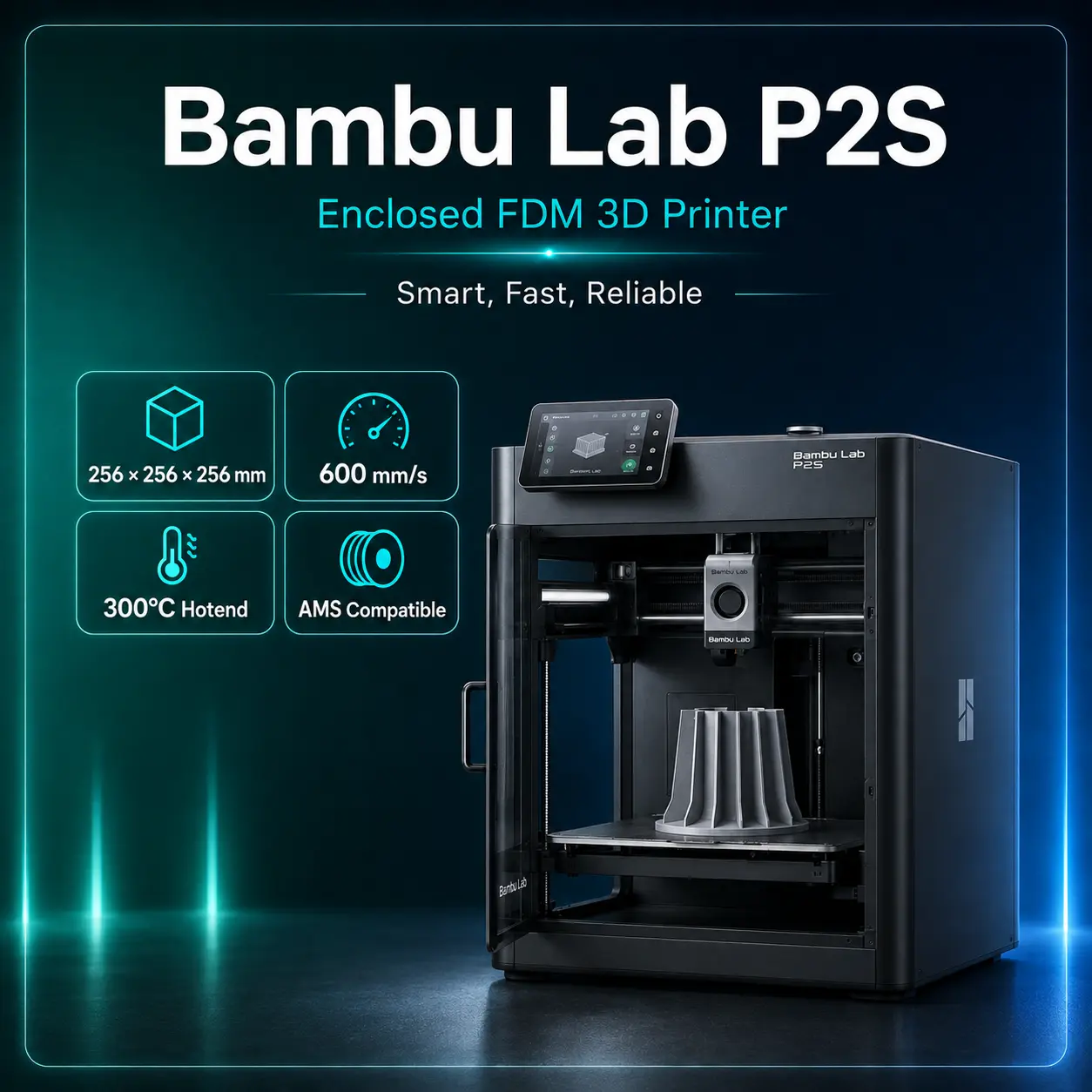
| Bambu Lab P2S | 256 × 256 × 256 mm | 600 mm/s max toolhead | 300°C / 110°C | AMS ecosystem | AMS 2 Pro 65°C | Enclosed, no active chamber heater |
| Bambu Lab P1S | 256 × 256 × 256 mm | 500 mm/s max toolhead | 300°C / 100°C | AMS ecosystem | Depends on AMS generation | Enclosed |
| Creality K2 Plus | 350 × 350 × 350 mm | 600 mm/s max print | 350°C / 120°C | CFS, up to 16 | CFS-dependent | 60°C active chamber |
| Bambu Lab H2D | Up to 350 × 320 × 325 mm | High-speed CoreXY | 350°C / 120°C | AMS ecosystem + dual nozzle | AMS 2 Pro support | 65°C active chamber |
Kobra S1 ACE 2 Pro competes mainly on price, drying and color expansion; more expensive rivals add stronger cameras, reinforced-material support, larger volumes or active chamber heating.
The Anycubic Kobra S1 ACE 2 Pro Combo vs Bambu Lab P2S Combo comparison is one of the strongest current buyer-intent keywords.
The Bambu Lab P2S provides a 256 × 256 × 256 mm build volume, 600 mm/s maximum toolhead speed, 20,000 mm/s² acceleration, 300°C hardened-steel nozzle, 110°C bed, 1080p/30 fps camera, activated-carbon filtration, and broad support for engineering and fiber-reinforced filaments.
The P2S Combo uses AMS 2 Pro with 65°C drying and sealed storage. Kobra S1 is slightly smaller but has a hotter 320°C nozzle, 120°C bed and up to 16-color expansion. P2S counters with hardened toolhead components, broader reinforced-material support, a better camera and a more mature Bambu ecosystem.
Choose Kobra S1 ACE 2 Pro Combo when price, 320°C/120°C thermal limits, 65°C drying, and 16-color expansion are the priority.
Choose Bambu Lab P2S Combo when reinforced-material support, camera quality, software ecosystem, and broader automation matter more.
For manufacturer specifications, see the official Bambu Lab P2S specifications.
The Bambu Lab P1S remains a popular enclosed CoreXY alternative.
P1S provides a 256 × 256 × 256 mm build volume, 300°C hotend, 100°C bed, 500 mm/s maximum toolhead speed, 20,000 mm/s² acceleration, activated-carbon filtration, and AMS compatibility.
The Kobra S1 ACE 2 Pro Combo has slightly less build volume but higher 320°C hotend and 120°C bed limits, a 600 mm/s headline speed, 65°C filament drying in the included material system, and up to 16 colors.
Choose Kobra S1 ACE 2 Pro Combo for stronger thermal limits and included 65°C drying. Choose P1S Combo for the mature Bambu Studio/AMS workflow and longer field history.
See the official Bambu Lab P1S page for current manufacturer specifications.
The Kobra S1 ACE 2 Pro Combo vs Creality K2 Plus Combo comparison is mainly compact value versus large-format engineering capability.
The Creality K2 Plus provides a much larger 350 × 350 × 350 mm build volume, up to 600 mm/s print speed, a 350°C hotend, 120°C bed, and an actively heated chamber up to 60°C.
One CFS provides four colors, while four CFS units can expand K2 Plus to 16 colors.
Choose Kobra S1 ACE 2 Pro Combo for compact size, active drying and lower entry cost. Choose K2 Plus Combo when the 350 mm cube and 60°C active chamber justify its larger footprint and price.
See the official Creality K2 Plus page for current specifications.
For existing Anycubic buyers, Kobra S1 ACE 2 Pro Combo vs Kobra S1 Combo may be the most important comparison.
The printer itself is fundamentally the same Kobra S1 platform.
The first-generation Combo uses ACE Pro:
The newer Combo uses ACE 2 Pro:
ACE Pro and ACE 2 Pro cannot be mixed together simultaneously on the Kobra S1.
For a new purchase, ACE 2 Pro is the more future-proof configuration unless the older Combo is heavily discounted.
The Anycubic Kobra S1 ACE 2 Pro Combo currently starts from US$574 in US, approximately €492 in Europe, £421 in the UK, C$792 in Canada, A$807 in Australia, ₹54,961 in India, and AED 2,108 in the UAE. Actual pricing may vary by region depending on local taxes or VAT, shipping costs, exchange rates, stock availability, plug configuration, selected bundles, filament promotions, and other regional offers.
It is the enclosed Kobra S1 CoreXY printer bundled with one ACE 2 Pro for four-color printing and 65°C active filament drying.
250 × 250 × 250 mm.
The current Kobra S1 manual lists 0.08–0.28 mm.
600 mm/s, with 300 mm/s recommended for general printing.
20,000 mm/s².
320°C.
120°C.
Four through the included ACE 2 Pro.
Anycubic specifies four ACE 2 Pro units in total plus compatible hub hardware for the full 16-color workflow.
Yes. It supports active drying up to 65°C and can dry while printing.
PLA, PETG, TPU 95A, ABS, and ASA.
No. TPU 95A must be fed directly to the printer.
Yes. LeviQ 3.0 handles automatic leveling and Z-offset setup.
Yes. The built-in camera supports monitoring up to 480p.
No dedicated active chamber heater or controlled chamber-temperature specification is currently published.
ACE 2 Pro raises drying to 65°C, adds humidity/temperature monitoring, active moisture control, sealed storage, updated feeding hardware, and expansion to 16 colors.
No. Anycubic states that the two generations cannot be used simultaneously in the same Kobra S1 multi-color setup.
Kobra S1 offers a hotter 320°C nozzle, hotter 120°C bed, 65°C drying, and up to 16 colors. P2S offers a slightly larger build volume, hardened toolhead components, 1080p camera, and broader reinforced-material support.
The Anycubic Kobra S1 ACE 2 Pro Combo currently starts from US$574, approximately €492 in Europe, £421 in the UK, C$792 in Canada, A$807 in Australia, ₹54,961 in India, and AED 2,108 in the UAE. Actual pricing may vary by region depending on local taxes or VAT, shipping costs, exchange rates, stock availability, plug configuration, selected bundles, filament promotions, and other regional offers.